Contents
View Zone Contents
To view content of the Zone.
On the Upper Menu Bar, click the DNS Reports icon.
Click the Graph & Statistics from the dropdown button.
Click Contents from the dropdown button of Graph & Statistics
Click Zone to select specific Zone.
Click Host to select specific Host.
Click Select Resource Record.
Click Search button to search Zone contents
Click Print Zone Contents Report to print the result.
Figure 4.2-a and 4.2-b below shows steps to view Zone and Host and Print Zone Contents Report.
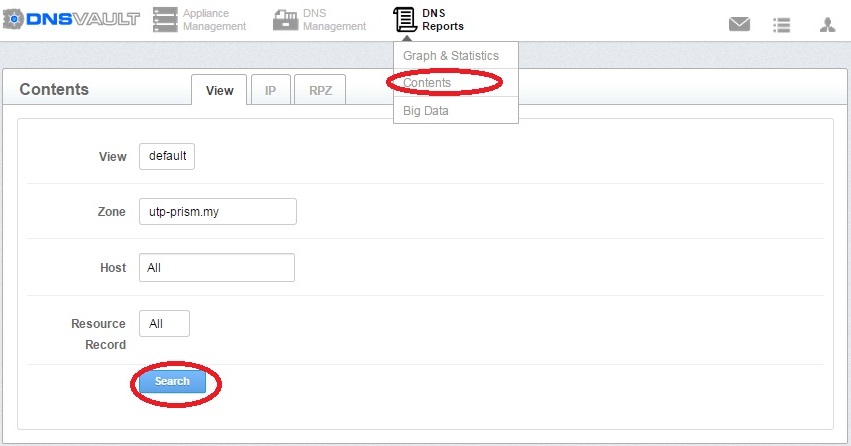
Figure 4.2-a Page Contents
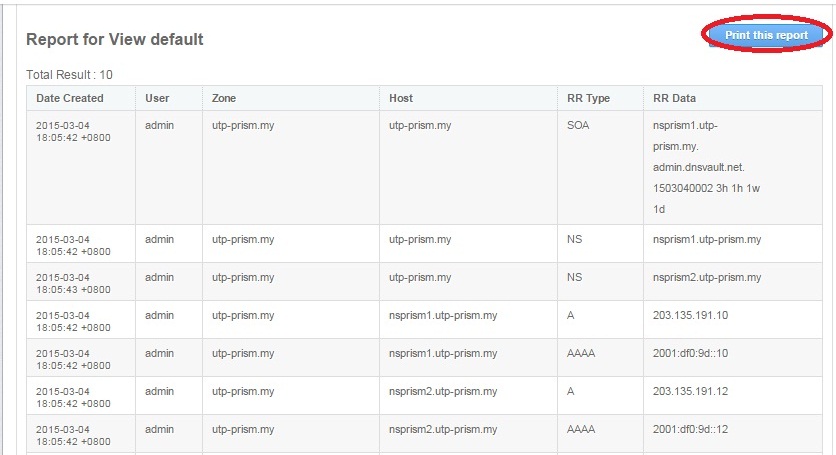
Figure 4.2-b Report for View default