Users
SNMP Users can be manage through web GUI. Figure 1.2.2.2-a show the list of SNMP user if available.
The steps to view SNMP Users are as follows:
On the Menu Bar, click Appliance Management. This will display a dropdown menu
To access setting page, click Settings
To show SNMP settings, click SNMP
Click on Users tab to manage SNMP users.
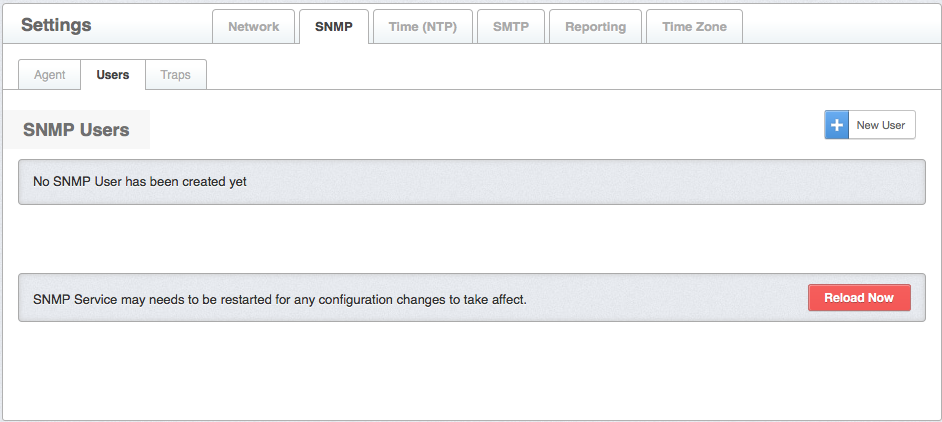
Figure 1.2.2.2-a : SNMP-User list
Steps to add SNMP Users are as follows:
Click New Users button to add new user
Choose SNMP Version on the dropdown, SNMP Version list out v1, v2c and v3
Insert Community Name for the SNMP
Click on check box for State either for Active user or not
Choose Algorithm on the dropdown, Algorithm list out none, MD5 and SHA
Note The MD5 message-digest algorithm is a widely used cryptographic hash function producing a 128-bit
Note The SHA secure hash algorithm is a widely used cryptographic hash function producing a 160-bit
- Choose Privacy Algorithm on the dropdown, Privacy Algorithm list out none, AES and DES
Note AES Advanced Encryption Standard is a specification for the encryption of electronic data established
Note DES Data Encryption Standard was a predominant symmetric-key algorithm for the encryption of electronic data
Choose Security level on the dropdown, Security level list out No-Auth(no-authorization), Auth(authorization) and Priv(private)
Insert Description, user may enter a description here for their reference
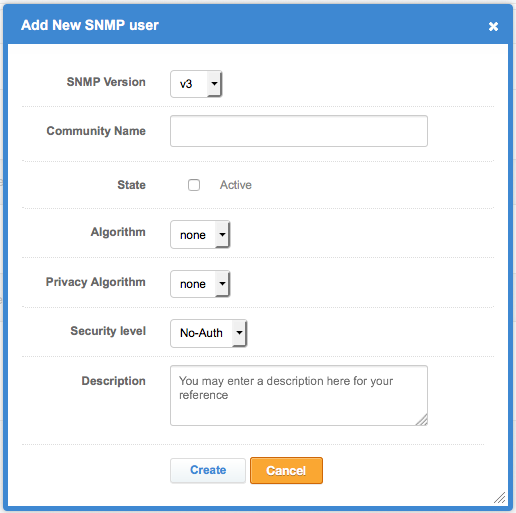
Figure 1.2.2.2-b :Add user
- Click Reload Now , SNMP Service may needs to be restart for any configuration changes to take effect